Alert Icon Icon of an exclamation point in a triangle.
Other cause: Routes 1X, 4, 6, 8, 18, 30X on detour July 20-26 for Hoopla 2026
View Service Alerts

WiFi on Cherriots buses

We're connecting our riders

July 2026: WiFi now available on Cherriots LIFT and Shop and Ride!

All Cherriots Local, Cherriots Regional, Cherriots LIFT, and Cherriots Shop and Ride buses have been outfitted with free, public WiFi! Now riders can connect their phones, tablets, and laptops to WiFi on the bus so they can check their email, read the news, or follow Cherriots on social media. 

Things to Know

Network Name: The network on each bus is called “Cherriots Public Bus WiFi” — connect with confidence!
Internet Speed: Our WiFi is meant for simple online tasks. The WiFi speed is not meant for streaming video and music.

Coverage: Our WiFi signal uses the same technology as a mobile phone, so it’s limited to the areas where mobile phones receive a good signal. Cherriots Regional riders especially, should prepare for the signal to drop in certain rural areas (Santiam Canyon, for example).

Pro Tip: If at a transit center, you may want to wait until the bus has departed to connect to the network, so you don’t accidentally connect to a different bus. If you do, you’ll lose your connection when the bus departs! 

Don’t Forget: we also offer free, public WiFi at the Downtown Transit Center and Keizer Transit Center. 

We’re excited to offer this feature on all Cherriots buses to give our riders a new convenience and an even better experience on the bus. When you ride Cherriots, you can stay connected in more than one way to the people and places you love!

Troubleshooting Tips

If your phone isn’t connecting, here are a couple of things you can try:

  • It’s always good to restart your phone once in a while. Try powering down the phone, then turning it back on again. This solves the problem most of the time.
  • Make sure your WiFi is on. Visit your phone settings to make sure WiFi is active.
  • Remember to wait until a bus has left a transit center before connecting to a network. All buses have the same network name, so you might be connecting to another bus and losing that connection when leaving the transit center.
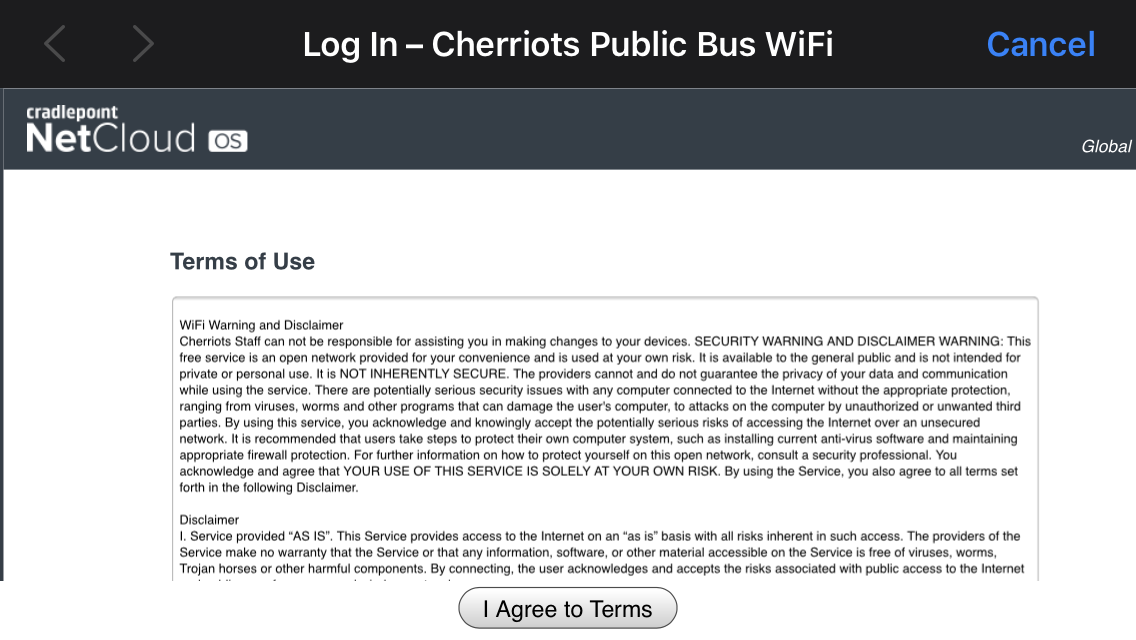
  • After you’ve joined the network, a log in page will appear that looks like this:

          You must click the “I Agree to Terms” button in order to connect to the network and use Cherriots WiFi.

  • If you're not able to connect, try asking another rider on the bus if their device can connect to WiFi. This will help you determine if the issue is with your device or with the bus network.
  • While we cannot offer technical support directly to riders, we always want to know if you’re having an issue so that we can make sure it’s not a problem with our system. Contact Cherriots Customer Service by emailing info@cherriots.org or by calling at 503-588-2877 to let them know what happened. Make sure you share the date, time, bus number (not the route number), and whether or not you've connected to Cherriots WiFi before.